

Dear Forward Kentucky members,
I am excited to share with you that we now have a mobile app for you to use!
It is a progressive web app, which means it works with any browser, anywhere. That also means that you can save it to your mobile device’s home screen, just like a regular app, and check it throughout the day.
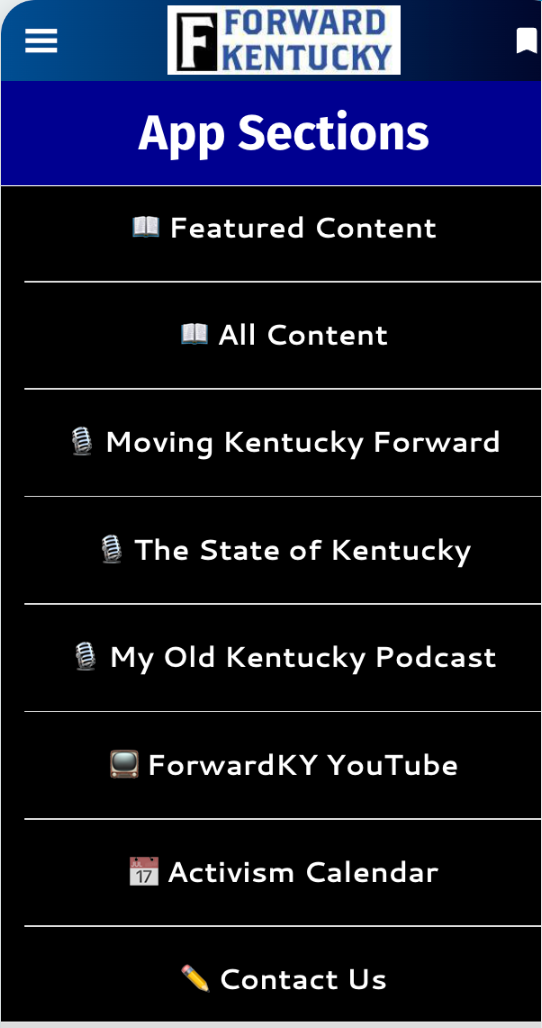
To the right is a picture of the home screen, which shows almost all of the functionality:
- A list of just the featured stories
- A list of all the stories
- Our three podcasts: Moving Kentucky Forward, The State of Kentucky, and My Old Kentucky Podcast
- The video versions of those interview shows from our YouTube channel
- The Activism Calendar
- And, a way to contact us from within the app
At the upper left is the standard “hamburger menu” which links to all those sections, but also has a place for you to fill out your profile.
At the top of each article or media content piece, there is a toolbar with four icons:
- A button for sharing the article
- Two buttons to make the text smaller or bigger
- And a button to save or “bookmark” the article to read later. (You get to your bookmarks through the main menu.)
I love it, I want it, how do I get it!!??!!
Pretty simple, actually: Just follow this link in the browser on your mobile device:
https://forwardkentucky.goodbarber.app
Once you get there, you’ll see a login screen. Do not try to log in yet. Instead, look at the bottom of that screen and click the “Sign up” link. You’ll have to put in your name, email, and some password you make up. Then click Next Step.
You’ll be asked to enter your email again, just to be sure it is entered correctly. Click the Register button. This will create your account in the mobile app.
You’ll get a validation email at whatever email you entered. Click the link in that email (using your email on your mobile device, if possible), and you’ll go back to the login screen, where you can log in with the email and password you created.
At that point, you’re registered and can use the app from within your mobile browser. BUT, if you want to use it like a regular app, you’ll need to add it to your home screen on your mobile device. On an iOS device, tap the Share button at the bottom of the screen, then More, then Add to Home Screen. (I assume it works the same on Android, but I don’t have a device to try it on. If you do, let me know how it’s done on Android.)
Important Notes!
- Your account in the mobile app is completely separate from your account on the ForwardKY web site. You can use the same email and the same password if you want, or something different, and it will have no effect on logging in to the web site itself.
- The mobile app includes all the day-to-day posts on the web site (articles, videos, podcasts). It does NOT include email newsletters, unless they also get posted to the web site. You’ll need to read those in your email inbox, like you do now. It also does not include any of the static pages, like the Bill Trackers or the Resources section.
- Because this is a web app, and not a native iOS or Android app, you can only get it by going to that link in your browser. Don’t look for it on the app stores, because it isn’t there.
- And also, because this is a progressive web app, it will work on a browser anywhere, including your table or desktop or laptop. Compared to our regular web site, it’s limited in functionality – but you may provide the more stripped-down interface.
- Very Important! The mobile app is free for anyone, ForwardKY member or not, to sign up for and use during the month of December. In January, it will move to being a paid perk, either as part of a paid membership or as a stand-alone purchase. (Or both.) So, please register on it, then use it a lot so you can see how you like it. I think it is going to be a useful tool for all our members – but ultimately, that is up to you to decide.
I have to admit, I’m pretty pleased with how this has turned out, and am excited to share it with all of you. Let me know what you think! And if there are features you want added, or something doesn’t work the way you think it should, either email me at [email protected], or use the Contact Us form in the app.
Enjoy!
Bruce
Comments